Microstep Dev Diary — Day 2: Core Features & Data Persistence
Today I worked on Day 2 of the goal tracking app project.
Originally, my plan was just to add a button and implement a simple goal input form, but I ended up building much more:
Goal input form: title, deadline (date or days), frequency, and session duration
AsyncStorage integration → goals persist even after restarting the app
Goal list view with progress bar
Routing for
/add-goal,/goal/[id],/goal/edit/[id]Short tap → navigate to detail view, long press → open edit view
UI improvements: adjusted header position, segmented toggle, button styling
In other words, the foundation of the μSTEP is now complete.
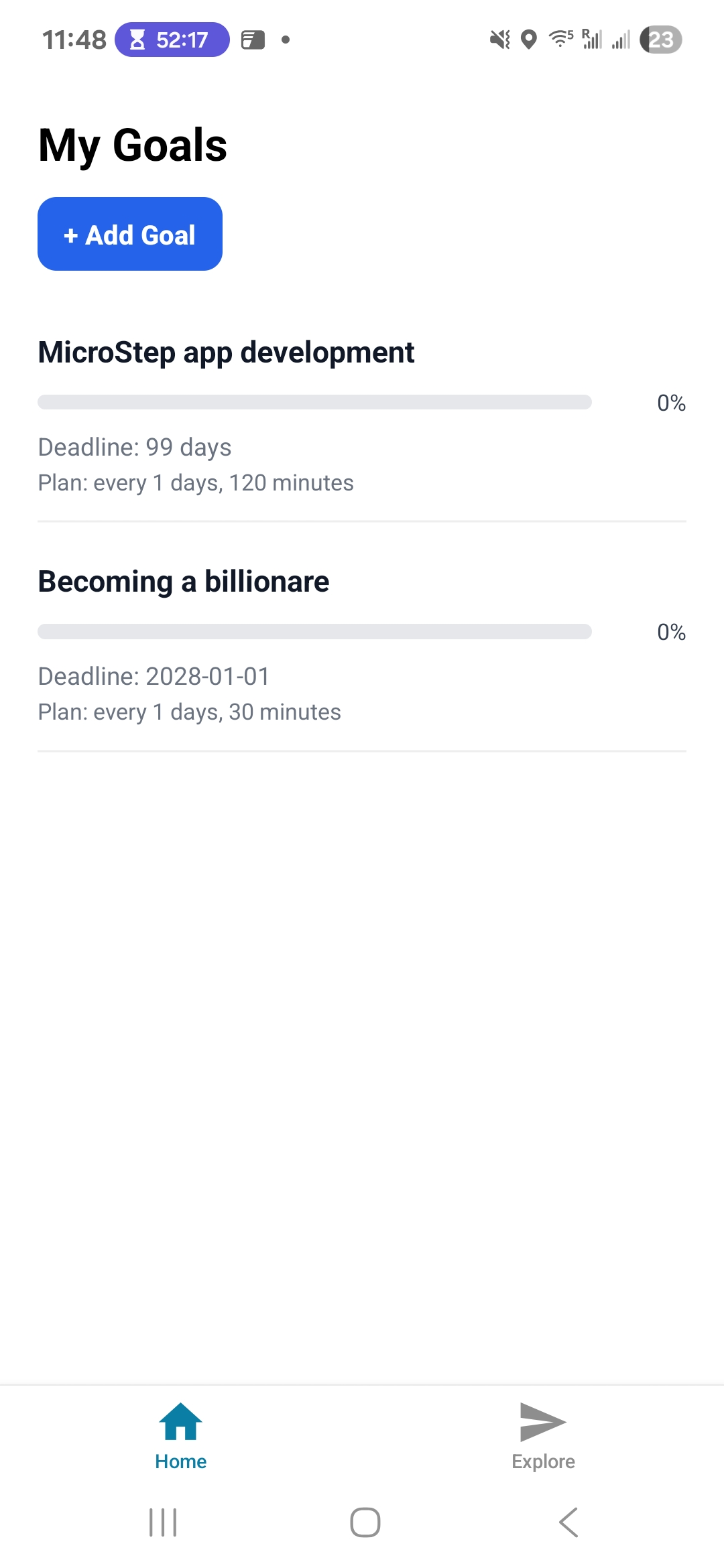
“Day 2: 목표 관리 앱 개발 – 기본 기능 완성과 데이터 저장”
오늘은 Day 2 개발을 진행했다.
ChatGPT가 알려준 계획은 버튼 만들고 목표 입력 정도였는데, 생각보다 많은 부분을 구현했다.
목표 입력 폼: 목표 이름, 데드라인(Date/Days), 빈도, 세션 시간
AsyncStorage 연결 → 앱을 껐다 켜도 데이터 유지
리스트 화면 구현: 진행도(progress bar)까지 표시
페이지 라우팅:
/add-goal,/goal/[id],/goal/edit/[id]리스트에서 짧게 탭 → 상세 화면, 길게 탭 → 수정 화면 이동
UI 개선: 헤더 위치 조정, 세그먼트 토글, 버튼 스타일
즉, μSTEP의 기본적인 뼈대를 완성한 셈이다.